How to Protect a TV From Kids: Practical Steps That Work
Recommended picks

Why TVs Are Vulnerable in Family Rooms
Modern flat panels are built thin and light, which makes them easy to knock off a stand with a thrown toy or a bumped console table. OLED and QLED panels in particular have fragile top-glass layers that can crack from a single moderate impact. Kids also touch screens constantly, and oils from small hands attract grit that scratches the anti-glare coating when wiped away. The problem compounds over time: micro-scratches reduce contrast and make the picture look hazy even when the panel is physically intact. Recognizing these failure modes lets you pick the right countermeasures rather than guessing.
Choose the Right Screen Protector
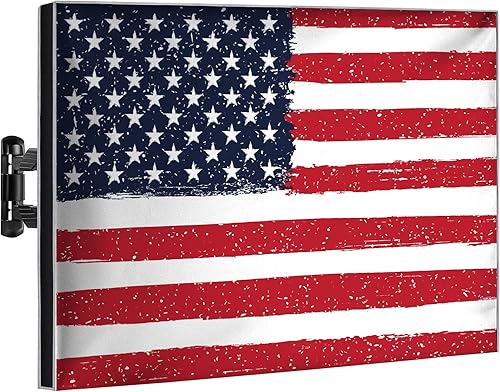
Screen protectors for TVs are rigid acrylic or tempered-glass panels that mount a short distance in front of the screen, absorbing knocks before they reach the display. The Garnetics USFLAGTV60-65 has over 14,600 ratings at 4.6 stars and costs around $44.98, making it one of the most widely purchased options for 60 to 65 inch sets. For smaller screens the iBirdie TV-Zipper protector carries 3,000 ratings at 4.7 stars and runs about $26.99, a strong choice for 40 to 43 inch sets. Measure your screen size diagonally before ordering because a protector even two inches too wide will not seat correctly. Look for a protector that is clear and anti-glare so picture quality stays sharp, and check that the mounting method does not require adhesive directly on the bezel.
Wall Mount the TV to Prevent Tip-Overs
A TV on a low stand or media console is easy for toddlers to pull down, and tip-overs cause the most severe injuries and the most total damage. Moving the TV to a wall mount puts it out of reach and eliminates the tip risk entirely. Choose a fixed or low-profile tilt mount rated for your TV's weight, and anchor the mount into wall studs rather than drywall anchors alone. Position the TV high enough that kids cannot push the bottom edge but not so high that viewing angles suffer, generally 42 to 48 inches from floor to screen center for a standing-height family room. If renting or avoiding wall holes, a furniture anchor strap secured to the back of the stand and a stud is a meaningful backup.
Manage Cables So They Cannot Be Pulled
Dangling HDMI, power, and antenna cables are irresistible to young children, and a hard yank on a cable can pull a TV off a stand or tear a port from its solder points on the board. Route cables through a cable raceway mounted on the wall, or run them inside the wall if your mount setup allows. For consoles and streaming devices on a shelf below, use right-angle adapters at the TV end so cables drop straight down rather than sticking out where they can be grabbed. Secure loose cable runs with adhesive clips every six to eight inches, keeping them flat against the wall and out of reach. A cable cover painted to match the wall makes the whole run nearly invisible.
Add Physical Barriers for High-Risk Spaces
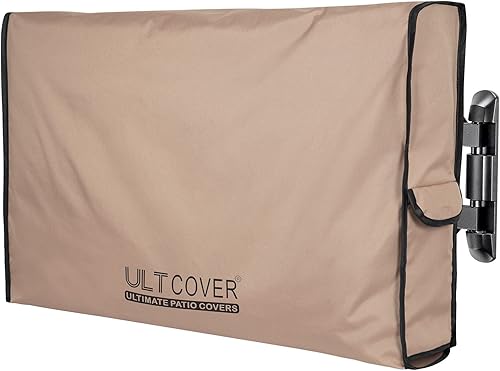
In playrooms or homes with very young children, a screen protector and a wall mount may still not be enough if the room has no adult supervision for stretches of time. A TV cabinet with locking doors solves this completely but hides the screen. A more practical middle ground is a furniture gate or play yard that keeps children a few feet back from the TV area. Some families use a low entertainment unit with a dedicated play zone on the opposite side of the room, reducing the chance kids wander directly to the screen. The Ultcover screen protector at around $32.99 with 2,300 ratings at 4.7 stars weighs only 1.48 lb, meaning it can be removed and reinstalled easily if you rearrange the room or travel with the TV.
Clean Fingerprints Without Damaging the Screen
A screen covered in fingerprints is a magnet for more touching because it already looks dirty. Clean it weekly using a dry microfiber cloth with light circular pressure, never paper towels or clothing which leave fine scratches. If you need moisture, dampen the cloth slightly with distilled water, never spray liquid directly on the panel. Avoid any cleaner that contains ammonia, alcohol, or acetone because these strip the anti-reflective coating. A screen protector makes cleaning easier because the acrylic surface is more durable than bare panel glass and tolerates gentle cleaning sprays that would otherwise be off-limits.
Common mistakes to avoid
- Buying a screen protector sized for the wrong TV. Measure the screen diagonal exactly before ordering, not the outer frame.
- Anchoring a wall mount into drywall only. Always hit at least two studs or use a certified toggle-bolt rated for the combined weight of the mount and TV.
- Leaving cables dangling at child height. Even one loose cable at the back of a stand gives kids a handle to pull on.
- Using glass cleaner or all-purpose spray on the panel. Ammonia-based cleaners dissolve the anti-reflective coating and cannot be undone.
- Positioning the TV on a narrow or wheeled console. A wider, heavier base dramatically reduces tip risk even if you cannot wall mount.
- Skipping the screen protector because the TV is wall mounted. Wall mounting prevents tip-overs but does nothing to stop a thrown object or an excited arm from cracking the panel.
Frequently asked questions
Do TV screen protectors affect picture quality?
A clear acrylic or tempered-glass protector adds a small air gap between the panel and the cover, which can slightly diffuse the image at extreme viewing angles. Most buyers with 4.4 stars or higher products like the Garnetics and iBirdie options report the picture difference is not noticeable during normal viewing. Anti-glare coatings on quality protectors can actually improve the picture in bright rooms by cutting down on reflections that the TV's own coating cannot eliminate.
At what age can I remove the screen protector?
There is no fixed age since it depends on your specific kids and how the room is used. Most parents find that around age six to eight children stop using the TV as a touch target and projectile-throwing slows down. Keep the protector as long as sports, gaming, or rough play happen in the same room, because teenagers with controllers can do as much damage as toddlers with toys.
Can I use a TV screen protector with a curved TV?
Most rigid flat-panel protectors are designed for flat screens and will not seat correctly against a curved display, leaving gaps at the edges that defeat the purpose. Check the product listing specifically for curved-TV compatibility before buying. If no compatible protector exists for your screen size and curve radius, focusing on a wall mount plus cable management is a better strategy.
Is a screen protector worth it for a TV under $300?
Yes, because replacing even a budget TV panel, if a repair shop will attempt it at all, can cost as much as buying a new set. A screen protector at $27 to $45 is a small fraction of any TV's replacement cost. If the TV has young children in the household, the protector almost always pays for itself the first time a toy connects with the panel.
Who should I contact if I have questions about TV protection gear?
You can reach the RalTV editorial team at hello@raltv.com. We answer questions about specific products and can point you to coverage that fits your screen size and setup.