Fixed vs Full-Motion TV Mount: Which Type Is Right for Your Room?
Recommended picks

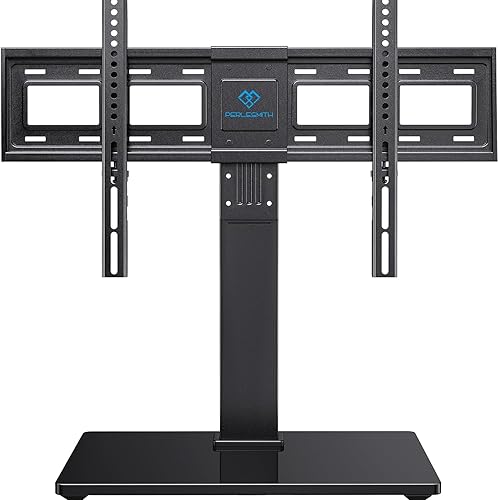

What a Fixed Mount Does
A fixed mount is a flat bracket that attaches directly to your wall studs and holds the TV in one position. There is no tilt, no swivel, and no arm to extend. Because the design is simple, fixed mounts tend to be lighter, cheaper, and easier to install than articulating ones. The Mounting Dream MD2361-K, rated 4.7 stars across more than 26,600 reviews and priced at $22.99, is a popular example of how affordable and well-reviewed fixed-style brackets can be. If your couch sits straight across from the wall and your room has consistent lighting, a fixed mount is usually all you need. The trade-off is that once the TV is up, adjusting the position means pulling the mount off the wall entirely.
What a Full-Motion Mount Does
A full-motion mount has one or more articulating arms that let you pull the TV away from the wall, swivel it left or right, and often tilt it up or down. This matters in open-plan rooms where seating is not directly in front of the TV, in kitchens where you want to angle the screen from a counter or a table, or in bedrooms where wall placement does not line up with the bed. Full-motion mounts are heavier hardware, require more care during installation, and cost more than fixed brackets. They also hold the TV several inches away from the wall even when folded flat, which is worth considering if a flush look matters to you.
Price and Weight Differences
Fixed mounts generally start below $25 and rarely exceed $60 for quality options. Full-motion mounts for mid-size TVs typically run $40 to $100, and models rated for very large or heavy screens can push higher. The Perlesmith PSTVS13 is a solid mid-range wall mount rated 4.7 stars from 28,200 buyers at $49.99, showing the range where well-reviewed brackets sit. Weight rating matters for both types. Check the mount's stated maximum load and compare it to your TV's weight, which is listed in the manual or on the manufacturer's website. A mount rated for 80 lb carrying a 55 lb TV is fine. A mount rated for 55 lb carrying an 80 lb TV is a safety problem.
Room Layout: The Deciding Factor
Draw out where your seating is relative to the wall. If all chairs and sofas face the TV head-on within a roughly 30-degree cone, a fixed mount gives you a clean, stable install. If seats are spread at angles, if the TV is in a corner, or if you use the same screen from a kitchen counter and a living room couch, a full-motion mount earns its extra cost. Open floor plans and L-shaped seating arrangements are the clearest cases for going articulating. A dedicated home theater room with a single sofa row is the clearest case for going fixed.
OLED and QLED Considerations
Modern OLED panels are thin and light, which makes them compatible with either mount type. However, OLEDs have more consistent color accuracy across viewing angles than older LCD panels, so you may not need to tilt or swivel as often to get a good picture. QLED and standard LED sets lose color accuracy and brightness when viewed from sharp side angles, which is one practical argument for a full-motion mount in a room with wide seating. If your TV is 65 inches or larger, confirm that the mount is rated for both the size range and the weight before buying. The Echogear EGAV-RTVF1, rated 4.7 stars across 12,900 reviews at $39.99, is a highly-rated option worth checking against your TV's VESA pattern and weight.
Installation Difficulty
Both types require finding and hitting wall studs. A stud finder and a level are the two tools you cannot skip. Fixed mounts require fewer moving parts to set up once the bracket is on the wall. Full-motion mounts have more components and heavier arms, so it helps to have a second person to hold the TV while you attach it. For both types, run cables before the TV goes up. With a fixed mount, you have almost no access to the back of the TV afterward. With a full-motion mount, you can pull the arm out to reach cables, but running them cleanly through the wall first makes the final result look better.
Common mistakes to avoid
- Buying a full-motion mount for a straight-on single-seating setup, paying more and getting a bulkier install than you need.
- Not checking the TV's VESA hole pattern before ordering. VESA 200x200 and VESA 400x400 are not interchangeable.
- Skipping the stud finder and anchoring into drywall only. Drywall anchors are not rated for TV loads.
- Ignoring the mount's weight limit. Always check your TV's weight in the spec sheet and compare it to the mount's rated capacity.
- Choosing a full-motion mount with a short arm reach for a corner installation, then finding the TV cannot swing far enough to face the room.
- Forgetting to plan cable routing before mounting. With a fixed bracket, you have almost no access to the back of the TV once it is on the wall.
Frequently asked questions
Is a fixed mount stable enough for a 65-inch TV?
Yes, provided the mount is rated for the size and weight of your specific set. Most quality fixed mounts list a maximum screen size and a maximum load in pounds. Check both against your TV before buying. Mounting into studs, not just drywall, is what keeps a large TV secure.
How far does a full-motion mount stick out from the wall when folded?
Most consumer full-motion mounts hold the TV 3 to 6 inches from the wall in the folded position. Some low-profile articulating mounts get closer to 2 inches, but those typically have a shorter arm extension range. If a flat, flush look matters to you, a fixed mount will always be closer to the wall.
Can I use a full-motion mount for a corner installation?
Yes, and corner installs are one of the best use cases for a full-motion mount. You need a model with enough arm extension to swing the TV clear of both walls and point it toward the seating area. Measure the corner angle and the arm's swivel range before buying to confirm the reach is sufficient.
Do I need to hire someone to install a TV mount?
Most people can install either type themselves with a stud finder, drill, level, and a second person to help lift the TV. The main risk is missing studs or overtightening bolts. If your walls are brick, concrete, or older plaster, professional installation is worth the cost since those surfaces need different anchoring hardware.
Will a full-motion mount work with my TV's VESA pattern?
VESA compatibility depends on your TV's hole spacing, not the brand or model name. Find the VESA spec in your TV's manual or on the manufacturer's website, listed as millimeters such as 400x400 or 600x400. Compare that to the mount's listed VESA range. Most mounts sold for 40-inch-and-up TVs cover common patterns, but always verify before purchasing.