How to Choose a TV Mount
Recommended picks


Understand VESA Patterns First
VESA is a standard that defines the spacing between the four mounting holes on the back of your TV, measured in millimeters (width x height). Common patterns include 200x200, 400x400, and 600x400, though large screens often use 800x400 or bigger. Every wall mount lists the VESA patterns it supports, and your TV's pattern must fall within that range. You can find the VESA spec on a sticker near the mounting holes, in the TV manual, or on the manufacturer's product page. If your bracket does not match, it simply will not bolt on, so verify this before anything else.
Check Weight Capacity Against Your TV
Every mount has a maximum weight rating, and your TV needs to come in under that number with room to spare. A 65-inch TV typically weighs 55 to 100 pounds depending on the panel type, so do not buy a mount rated at exactly your TV's weight. Thinner OLED panels tend to weigh less than similarly sized LED sets, but always look up your specific model. A highly rated bracket like the Wali TVS001 (4.5 stars across 42,200 reviews) is a good example of a compact fixed mount that covers lighter sets, while heavier TVs need hardware with a higher rated capacity. When in doubt, choose the bracket with a higher rating rather than cutting it close.
Fixed, Tilting, or Full-Motion: Which Style Fits Your Room
Fixed mounts hold the TV flat against the wall and put it about an inch or two from the surface. They are the sturdiest option and work well when your seating is directly centered on the screen. Tilting mounts let you angle the screen downward, which helps when the TV is mounted higher than eye level, such as above a fireplace. Full-motion (articulating) arms extend out from the wall and swivel left or right, giving you flexibility in rooms where seating is spread across different angles or where you need to push the TV aside to access ports. Full-motion brackets cost more and require sturdier wall anchoring because the arm creates leverage when extended.
Know Your Wall Type Before You Buy Hardware
Stud-mounted brackets are the most secure installation for drywall walls: find the studs (typically spaced 16 inches apart), drill into them, and the mount is supported by solid wood. The Mounting Dream MD2361-K (4.7 stars, 26,600 reviews, $22.99) is a popular fixed bracket often installed this way. Concrete and brick walls need masonry anchors and a hammer drill, not standard wood screws. Thin walls or metal-stud construction require different anchor hardware rated for hollow cavities. Never rely on drywall anchors alone for a TV heavier than about 20 pounds. If you are unsure what is inside your wall, a stud finder with AC detection can help, or a hardware store associate can point you to the right anchors for your wall type.
TV Size and Viewing Height Matter
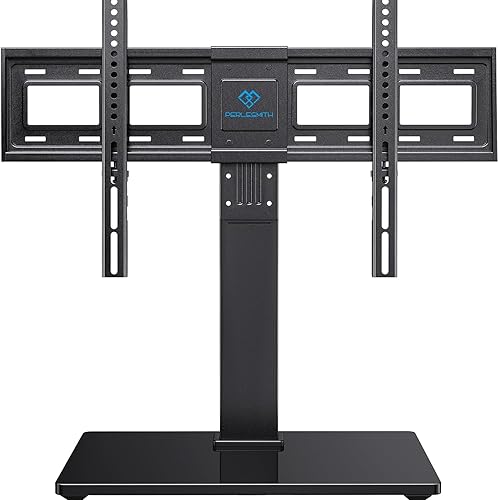
The bracket you choose should list a compatible screen size range, and your TV should fall within it. A mount rated for 32 to 70 inches will not have the right arm span for an 85-inch set. For viewing height, the center of the screen should sit roughly at eye level when you are seated, which is typically 42 to 48 inches from the floor for most couches. Mounting too high strains your neck over time. If you are installing above furniture or a fireplace and the height is fixed, a tilting mount helps angle the screen down toward eye level. The Perlesmith PSTVS13 (4.7 stars, 28,200 reviews, $49.99) is a well-reviewed tilting bracket that handles a wide range of screen sizes and covers many common room setups.
Cable Management and Clearance
After the TV is on the wall, you still need to route HDMI cables, power, and potentially antenna or optical cables. Fixed mounts sit close to the wall, which leaves little room to plug in cables from behind unless your TV has side-facing ports. Full-motion mounts naturally offer more cable access since you can swing the TV out. Plan your cable runs before you finish the install: running cables through the wall requires a recessed power kit or in-wall cable conduit. If you need to access the back of the TV regularly, a mount that allows the TV to pull away from the wall saves time. Always account for the depth of any HDMI plugs or dongles when choosing how close to the wall you want the set to sit.
Common mistakes to avoid
- Not checking the VESA pattern before ordering, then discovering the bracket bolt holes do not align with the TV.
- Mounting into drywall without hitting studs, which can result in the mount pulling free under the TV's weight.
- Choosing a mount with a weight rating that barely matches the TV rather than leaving a comfortable safety margin.
- Installing the TV too high on the wall because it looks good in an empty room, then realizing it causes neck strain during normal viewing.
- Forgetting to measure cable clearance and finding that HDMI plugs cannot seat fully because the TV sits too close to the wall.
- Buying a fixed mount when the room has multiple seating positions at different angles, making the picture hard to see from the sides.
Frequently asked questions
How do I find my TV's VESA pattern?
Look at the back of your TV for four threaded holes arranged in a rectangle near the center. Measure the horizontal distance between the left and right holes, then the vertical distance between the top and bottom holes, in millimeters. That gives you your VESA pattern, for example 400x300. You can also check the TV's manual or search the model number on the manufacturer's website.
Can I mount a TV without hitting a stud?
You can use toggle bolts or specialty hollow-wall anchors rated for your TV's weight, but this approach is less reliable than stud mounting and is generally not recommended for TVs heavier than about 20 pounds. For most 40-inch and larger TVs, hitting at least one stud and using a rated toggle anchor for the other side is a safer approach. If no studs are accessible, a professional installer can assess your specific wall and choose the right hardware.
What is the difference between a tilting and a full-motion mount?
A tilting mount lets you angle the screen up or down from a fixed point on the wall, typically 5 to 15 degrees of tilt, which is useful when the TV is mounted above eye level. A full-motion mount swings the TV out from the wall and rotates it left or right, allowing you to change the viewing angle from multiple seating positions. Full-motion mounts cost more and put more stress on the wall when the arm is extended, so they need a solid anchor into studs or masonry.
How high should I mount my TV?
The center of the screen should be at roughly seated eye level, which is about 42 to 48 inches from the floor for a standard sofa. For a 55-inch TV, that puts the bottom of the screen around 28 to 34 inches up. Mounting significantly higher, such as above a mantle, forces you to look up and can cause neck discomfort over long viewing sessions. If a higher mount is unavoidable, use a tilting bracket to angle the screen downward.
Do I need special hardware for a concrete or brick wall?
Yes. Standard wood screws will not grip in concrete or brick. You need masonry anchors, typically sleeve anchors or wedge anchors, and a hammer drill with a masonry bit sized to match. The anchors must be rated for the weight of your TV and mount combined. This type of installation is more permanent and more secure than stud-only drywall installs, but it requires more effort and the right tools. If you are not comfortable using a hammer drill in masonry, hiring an installer is a reasonable option.