Is QLED Worth It? What to Know Before You Buy
Recommended picks


What QLED Actually Does
QLED stands for Quantum Light-Emitting Diode. The panel itself is still an LED-backlit LCD, but a layer of quantum dot material sits in the light path and converts blue LED light into a much purer red and green. The result is a wider color gamut, covering a larger portion of the DCI-P3 color space that 4K HDR content is mastered for. Brightness also improves, which lets a QLED hold its picture quality in a sunlit room where a standard LED would look washed out. What QLED does not fix is the black level problem of LCD: because backlighting is still involved, true blacks are not as deep as those on OLED.
Who Gets the Most Out of QLED
Buyers who watch a lot of sports, daylight TV, or 4K HDR movies will notice the biggest gains. The Hisense 75U6HF, a 75-inch 4K QLED rated 4.2 stars across 4,800 reviews and priced around $997, is a good example of where QLED value concentrates: a large screen that fills a main living room where overhead lights stay on. Gamers running a 120 Hz or 144 Hz signal also benefit, since most QLED models at mid-range prices now offer faster refresh rates. Buyers who watch almost entirely in a dark home theater room, or whose main content is dark drama and horror, will get more per dollar from OLED.
QLED at the Budget End
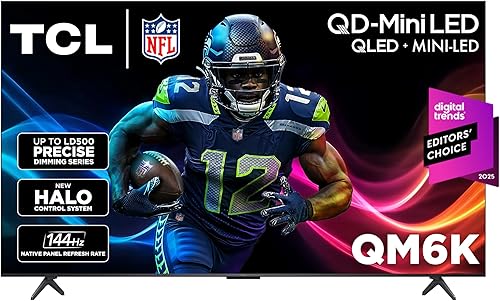
Affordable QLED has improved sharply. The TCL 55QM6K is a 55-inch 4K model with a 144 Hz refresh rate, Google TV, and Ethernet, priced at $447.99 with 1,689 reviews at 4.4 stars. That is a strong signal that budget QLED now delivers real-world satisfaction, not just a marketing badge. At this price tier, the quantum dot layer gives color you simply do not get from an entry-level LED set, and 144 Hz makes it a capable gaming TV as well. The trade-off at budget QLED is typically dimmer peak brightness and simpler local dimming compared to mid-range models.
QLED in the Mid-Range: Where the Value Peaks
The mid-range, roughly $700 to $1,000 for a 65-inch screen, is where QLED delivers the clearest case for the upgrade. The Samsung QN65Q80D is a 65-inch 4K QLED with a 120 Hz refresh rate and Tizen smart platform, priced at $917.49 with 418 reviews at 4.2 stars. At this level you get full-array local dimming on many models, which pushes contrast noticeably beyond what entry QLED provides, while still benefiting from quantum dot color. The jump from a $500 LED to a $900 QLED of similar size is where most buyers feel the picture improvement most directly.
QLED vs. Standard LED: The Real Differences
The color volume advantage of QLED shows most clearly on content that pushes wide color gamut, such as 4K Blu-ray and streaming HDR titles on Netflix and Disney Plus. On regular cable or standard-definition content, the two technologies look far more similar. Brightness is the second key gap: QLED panels routinely reach higher nit levels than comparably priced LED sets, which matters both for HDR highlights and for fighting room reflections. Motion handling depends on refresh rate and processing rather than the quantum dot layer itself, so compare Hz specs rather than assuming QLED automatically handles motion better.
When QLED Is Not Worth the Extra Cost
Skip the QLED premium if your room is permanently dark, because the brightness advantage is wasted and an OLED at the same budget will give you better contrast and viewing angles. It is also hard to justify if you watch content that never carries HDR metadata, since HDR is the main use case for wide color gamut. Screens under 43 inches rarely show a visible difference between LED and QLED at normal viewing distances. Finally, if you are comparing a basic QLED against a well-specified LED from the same brand at the same price, read the spec sheet carefully: a higher-tier LED with better local dimming can beat a low-tier QLED on contrast.
Common mistakes to avoid
- Buying QLED for a dedicated home theater room and missing out on the deeper blacks that OLED provides at similar prices.
- Assuming all QLED TVs have the same picture quality. The quantum dot layer is consistent, but local dimming quality and peak brightness vary a lot by model tier.
- Overlooking refresh rate. A 60 Hz QLED will show motion blur during fast sports and gaming just as a 60 Hz LED would. Check for 120 Hz or 144 Hz if that matters to you.
- Choosing screen size based on QLED marketing rather than room size. A 55-inch QLED in a small bedroom often looks better than a 75-inch QLED crammed into the same space.
- Ignoring smart platform differences. QLED TVs ship with Tizen, Google TV, Roku, and Android TV depending on brand. The app catalog and interface speed differ meaningfully.
- Confusing QLED with OLED based on similar names. QLED is still an LCD technology and cannot match OLED black levels, but it can exceed OLED in peak brightness at lower prices.
Frequently asked questions
Is QLED better than regular LED?
Yes, in most measurable ways. The quantum dot layer widens the color gamut and allows higher peak brightness compared to a standard LED panel at the same price. The improvement is most visible on 4K HDR content and in bright rooms. On non-HDR content or in a dark room, the gap shrinks considerably.
Is QLED worth the extra cost over a budget LED TV?
It depends on screen size and viewing environment. At 55 inches and up in a living room with natural light, the color and brightness gains are visible enough to justify a moderate price premium. Below 43 inches or in a very dark room, the difference is harder to see and the extra cost is harder to defend.
How does QLED compare to OLED?
OLED produces true black because each pixel shuts off independently, which gives it better contrast in dark rooms. QLED can hit higher peak brightness and tends to cost less at large screen sizes. For a bright living room, QLED often wins on value. For a dim home theater, OLED's contrast advantage is more compelling.
Do I need HDR content to benefit from QLED?
Not entirely, but HDR is where QLED shines most. Wide color gamut and high peak brightness are what HDR content is mastered to take advantage of. On standard dynamic range content, QLED still looks good, but the gap versus a regular LED is much smaller. If nearly all your viewing is SDR cable or older streaming content, the QLED premium is harder to justify.
Does QLED make a difference for gaming?
Yes, if you pair it with a 120 Hz or 144 Hz model. The quantum dot color makes games with HDR pop noticeably, and higher refresh rates reduce blur and input lag on supported consoles and PCs. Make sure the model you choose has at least one HDMI 2.1 port if you want 4K at 120 Hz from a PS5 or Xbox Series X. Contact us at hello@raltv.com if you have questions about specific models.