What Is a QLED TV?
Recommended picks


How Quantum Dots Actually Work
A conventional LED TV shines a white or blue LED backlight through a color filter to produce red, green, and blue subpixels. Quantum dot TVs replace the color filter with a film of nano-sized crystals. When blue LED light hits those crystals, each crystal glows at a very specific wavelength, producing purer reds and greens than a traditional filter can. The purer the primaries, the wider the color gamut the TV can cover, which is why QLED sets typically reach 90 percent or more of the DCI-P3 color space used in cinema content. More saturated primaries also mean the panel can hit higher peak brightness without washing out colors, a combination that makes HDR content look noticeably more vivid.
QLED vs. Standard LED: What Changes Day to Day
In a bright living room, a QLED's higher peak brightness is the most noticeable difference. Sunlight coming through a window can wash out a standard LED screen, while a QLED panel with 500 to 1,000 nits of peak brightness holds its contrast better. Color accuracy is the second real-world benefit: sports jerseys, nature documentaries, and animated films all look richer because the color volume stays high even at elevated brightness levels. The gap is less dramatic in a dim room, where even a mid-range LED can look very good. Where QLED still falls short of OLED is black level, because the LED backlight cannot shut off completely the way an organic pixel can, so very dark scenes may show a faint glow in the corners.
Refresh Rate and Gaming Performance
Many QLED sets ship with a 60 Hz panel, which is fine for cable TV, streaming, and casual gaming. Models targeting gamers push up to 120 Hz or even 144 Hz, which reduces motion blur and supports variable refresh rate features that sync the TV to a game console or PC graphics card. The TCL 55QM6K, for example, is a 55-inch 4K QLED with a 144 Hz panel rated 4.4 stars across 1,689 reviews, priced around $448, and it runs Google TV for streaming app access. If gaming is a priority, look for the 120 Hz or 144 Hz spec rather than assuming the QLED label alone means smooth motion.
Screen Size and Value
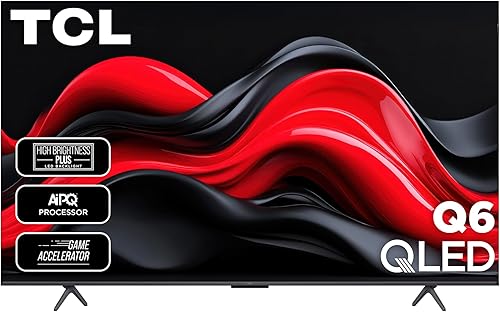
QLED panels span a wide range of sizes and prices, which makes the technology accessible at most budget levels. The TCL 55Q651G is a 55-inch 4K QLED on Google TV, rated 4.3 stars across 2,509 reviews, and sells for around $318, making it one of the lower entry points into quantum dot picture quality. At the larger end, the Hisense 75U6HF brings a 75-inch 4K QLED panel with Android TV, Bluetooth, Ethernet, and Wi-Fi to a price around $997, earning 4.2 stars from 4,800 buyers. For something in the mid-range, the Samsung FBA2SAMQN65Q60BA is a 65-inch 4K QLED with a 60 Hz refresh rate, Tizen smart platform, and a 4.4-star rating from 2,532 reviewers at around $628. The size-to-price ratio with QLED is generally better than OLED at screens 65 inches and above.
Local Dimming and Why It Matters
Local dimming is the feature that most determines whether a QLED's blacks look acceptably deep. A TV with full-array local dimming divides the backlight into dozens or hundreds of individually controlled zones. When a dark scene plays, those zones dim independently so the backlight does not spill into the black areas. Edge-lit TVs, where the backlight runs only along the screen border, have far fewer zones and produce more visible halo glow around bright objects on dark backgrounds. Budget QLED sets often use edge lighting to keep costs down, so if dark-scene quality matters to you, look for full-array local dimming (sometimes labeled FALD or Mini-LED) in the spec sheet before buying.
Smart Platforms on QLED TVs
Most QLED TVs ship with a built-in operating system, and the platform you get depends on the brand. Samsung uses Tizen, which has a large app library and a clean interface but keeps some features inside Samsung's ecosystem. Hisense and TCL models in this category often run Android TV or Google TV, which gives access to the full Google Play store and works naturally with Google Assistant. Roku TV is available on models from Roku-branded sets and is widely regarded as the simplest interface. The smart platform matters because app availability, update longevity, and remote design vary significantly across them. If you already own a streaming stick you prefer, the built-in OS matters less, but it still affects how quickly the TV boots and how the home screen is organized.
Common mistakes to avoid
- Assuming every QLED has the same picture quality. Quantum dots improve color, but local dimming zone count and peak brightness vary widely across QLED models at different price points.
- Ignoring the refresh rate label. A 60 Hz QLED is not the same as a 120 Hz or 144 Hz model for gaming or fast sports, even if both carry the QLED name.
- Confusing QLED with OLED. QLED is an LED backlit LCD using quantum dots. OLED uses self-emitting organic pixels. Black levels, viewing angles, and pricing differ considerably between the two.
- Buying a QLED solely for HDR without checking peak brightness. HDR content needs at least 400 to 600 nits to look noticeably different. A low-brightness QLED labeled HDR-compatible may not deliver a meaningful HDR experience.
- Overlooking edge-lit vs. full-array backlight. Budget QLEDs often use edge lighting, which produces visible halo glow on dark scenes despite the quantum dot color layer.
- Not matching screen size to viewing distance. A 75-inch QLED in a 10-foot room will look fine, but at closer distances the angular resolution of a 4K panel starts to matter more than the color technology.
Frequently asked questions
Is QLED better than regular LED?
For most people in a normally lit room, yes. The quantum dot layer produces purer reds and greens, which widens the color gamut and lets the panel maintain color accuracy at higher brightness levels. The practical difference is most visible on HDR movies and sports. In a very dim home theater, the gap narrows and OLED's perfect blacks may be more appealing.
Does QLED mean 4K?
No. QLED describes the quantum dot color technology, not the resolution. Most QLED TVs sold today are 4K UHD, but there are also 8K QLED models at the high end. Always check the resolution spec separately from the QLED label when comparing models.
Is QLED good for gaming?
It can be, but the refresh rate and input lag spec matter more than the QLED label itself. A 120 Hz or 144 Hz QLED with a low input lag mode is a solid gaming display. Models like the TCL 55QM6K offer 144 Hz at 4K on Google TV for around $448. A 60 Hz QLED is fine for casual gaming but will not support high-frame-rate titles from current consoles.
How long do QLED TVs last?
The quantum dot film itself is stable and does not degrade the way OLED pixels can with certain static images over very long periods. Typical LED TV panel life is rated at 60,000 to 100,000 hours to half brightness under average home use. In practice, most buyers upgrade their TVs well before the panel shows any measurable decline.
Who makes QLED TVs besides Samsung?
Samsung coined the QLED trademark, but other brands use quantum dot technology under different names. Hisense calls it ULED or Quantum Dot, TCL labels it QLED on models in their Q-series lineup, and Vizio uses Quantum Color. All of these use a quantum dot layer on an LED backlit LCD panel. The underlying technology is similar, though brightness, local dimming zones, and software experience differ by model.