Are OLED TVs Worth It?
Recommended picks

What Makes OLED Different
Every pixel in an OLED panel produces its own light and can switch off completely. That means black is actually black, not a very dark gray lit from behind. The result is contrast that LED TVs, even premium mini-LED models, cannot fully replicate. Colors also look accurate at wide viewing angles, so the picture holds up when you are sitting off to the side. The panel itself is thin because there is no separate backlight layer, which is why most OLED sets look noticeably slimmer than LED competition.
The Real Cost of Owning an OLED
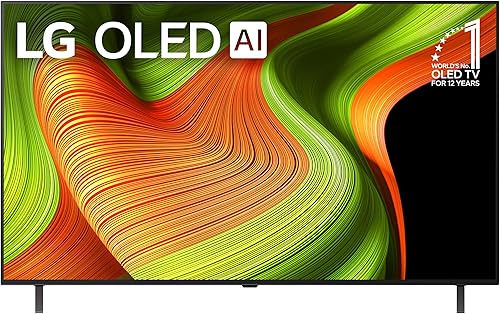
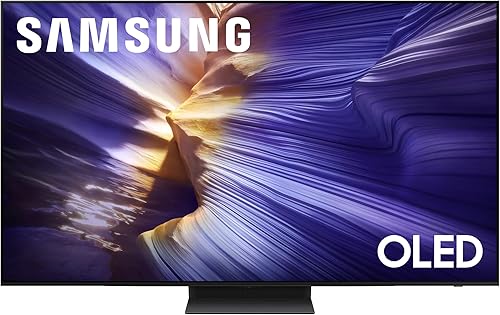
Entry-level OLEDs from LG now start around $900 for a 55-inch set. The LG OLED55B5PUA (55", 4K, 120Hz, webOS, rated 4.5 stars across 200 reviews) sits at $899.99 and represents the realistic floor for a brand-new OLED. Mid-range models like the Samsung QN65S90FAFXZA (65", 4K, 144Hz, Tizen, 4.4 stars from 457 reviews) run $1,397.99 and add a faster 144Hz panel useful for gaming. At the premium end, the LG OLED55G4SUB (55", 4K, webOS, 4.5 stars from 255 reviews) lists at $1,416.90. Beyond the sticker price, OLED panels typically use more power than comparably sized LED sets, so factor that into a long-term cost view.
Where OLED Shines
Dark-room movie watching is where OLED earns every dollar. The per-pixel dimming makes shadow detail in films look exactly as the director intended, and bright highlights pop against a genuinely black background. Gaming is a strong second use case. A 120Hz or 144Hz OLED panel responds instantly with no backlight lag, and the low input latency most OLED sets support makes fast games feel precise. Streaming HDR content also looks its best on OLED because the local dimming zones that LED TVs use to fake deep blacks are simply not needed.
Where OLED Falls Short
Bright rooms are the main weakness. OLED panels are improving in peak brightness, but a sunny living room with windows behind the viewer will wash out the image more than a high-brightness LED or QLED can handle. Burn-in is a real risk if static images sit on screen for long stretches, though modern OLED panels have built-in pixel-refresh routines that reduce the risk for typical TV use. If you leave news tickers, sports scoreboards, or game HUDs on screen for many hours every day, the risk is higher. Price per inch also stays elevated compared to LED sets at the same screen size.
OLED vs. QLED: Which One for You
QLED uses a quantum-dot filter over an LED backlight to push brightness higher than standard LED sets. In a bright room, QLED often wins on raw brightness and HDR peak highlights. OLED wins on contrast ratio, viewing angle, and response time. Choose QLED if your room gets a lot of natural light or if you want the biggest screen for the least money. Choose OLED if picture accuracy, true black, and low input latency matter more than maximum brightness. Both technologies now deliver 4K resolution and 120Hz refresh rates in the same price tiers, so the decision comes down to your room and viewing habits, not specs on a sheet.
Who Should Buy an OLED TV
An OLED TV makes clear sense for home theater enthusiasts who watch films in a darkened room, for serious console or PC gamers who want the fastest possible response and accurate color, and for anyone who values picture quality over screen size and is willing to spend more per inch to get it. It is a harder sell for households that watch TV all day in a bright kitchen or living room, for buyers who mainly watch sports and leave the scoreboard visible for hours, or for anyone stretching a tight budget. If the budget and the room conditions match, OLED is consistently the highest-rated display technology in buyer reviews across the major brands.
Common mistakes to avoid
- Buying an OLED for a room with large windows directly behind the viewer. Bright ambient light kills the contrast advantage that makes OLED worth the premium.
- Ignoring screen size tradeoffs. OLED costs more per inch, so some buyers end up with a smaller OLED when a larger LED set would have suited their room better.
- Worrying too much about burn-in for normal use. Static image burn-in is a real risk only for users who leave the same image on screen many hours a day, every day.
- Skipping the room lighting test. Watch something dark and cinematic at the store in dim light before buying. Bright showroom floors favor high-brightness LED sets.
- Buying a 4K OLED without checking HDMI 2.1 ports for gaming. Not every model has the full-bandwidth ports needed for 4K 120Hz from a PS5 or Xbox Series X.
- Overlooking the smart platform. LG uses webOS, Samsung uses Tizen, and Sony uses Google TV. Each has a different app ecosystem, and switching platforms later means buying a new TV.
Frequently asked questions
How long do OLED TVs last?
Most manufacturers rate OLED panels at 30,000 hours or more to half brightness, which works out to over 20 years at four to five hours of daily use. Real-world longevity depends heavily on brightness settings and whether static images are left on screen for extended periods. Running the TV at moderate brightness and using the built-in pixel-refresh features extends panel life considerably.
Is burn-in a serious problem with OLED TVs?
Burn-in is possible but unlikely for viewers who use their TV normally. It becomes a realistic risk when the same static element, such as a cable news ticker, a game HUD, or a channel logo, sits in the same spot on screen for many hours every day over months or years. Modern OLED sets include automatic pixel-refresh cycles and screen-saver timers that reduce this risk for typical household use.
Are OLED TVs good for gaming?
OLED panels are among the best displays available for gaming. The per-pixel response means motion blur is minimal, and most current OLED sets support low input latency modes with 120Hz or 144Hz refresh rates. The Samsung QN65S90FAFXZA, for example, runs at 144Hz (4.4 stars, 457 reviews) and pairs well with current-generation consoles and gaming PCs. Gamers who run the same HUD overlay for many hours a day should keep screen-saving features enabled.
What size OLED TV should I buy?
The right size depends on viewing distance. A common guideline is to sit roughly 1.5 times the screen diagonal away from a 4K set, which puts a 65-inch TV at about 8 feet. OLED sets are available from 42 inches up to 83 inches and beyond. Keep in mind that cost per inch is higher with OLED than with LED, so some buyers choose a 55-inch OLED over a 65-inch LED and get a net improvement in picture quality at a similar price.
Can I use an OLED TV in a bright room?
You can, but the main advantage of OLED is much less visible in strong ambient light. Bright LED and QLED sets produce higher peak brightness, which makes HDR highlights more visible in a sunny room. If your viewing space has large windows or overhead lighting that cannot be controlled, a high-brightness LED or QLED will likely deliver a more satisfying picture than an OLED at the same price. Contact us at hello@raltv.com if you want a specific recommendation for your setup.