Do You Need a Streaming Device If You Already Have a Smart TV?
Recommended picks

What a Smart TV's Built-In Platform Actually Does
Every smart TV ships with a streaming platform baked into its firmware. Brands use their own systems, Roku OS, Google TV, or Fire TV depending on the model. That platform handles your app store, search, and home screen. The catch is that the processor and memory soldered onto the TV's main board are fixed at the factory. When the platform gets heavier over time, the hardware does not grow with it, and slowdowns follow. Manufacturers also tend to cut software support on older panels well before the display itself wears out.
Signs Your Smart TV Needs a Streaming Device
A slow home screen that takes several seconds to respond is the clearest sign. If an app you want, such as a newer sports or fitness service, is no longer available in your TV's app store, the platform has likely been sunset. Frequent buffering on a fast internet connection points to a processor bottleneck rather than a network problem. If the TV's voice remote is unresponsive or the search results are outdated, the underlying software has not been updated in a long time. Any one of these is enough reason to add a dedicated player.
When You Can Skip the Extra Device
If your TV runs a current version of Roku OS, Google TV, or Fire TV and receives regular updates, you likely do not need anything extra. TVs released in the last 18 to 24 months with name-brand platforms generally have fast enough processors for 4K streaming and broad app libraries. You also do not need a second device if you only use one or two apps and are satisfied with how the TV handles them today. Adding a streaming player to a perfectly functional smart TV just creates another remote and another HDMI port to manage.
What a Dedicated Streaming Player Adds
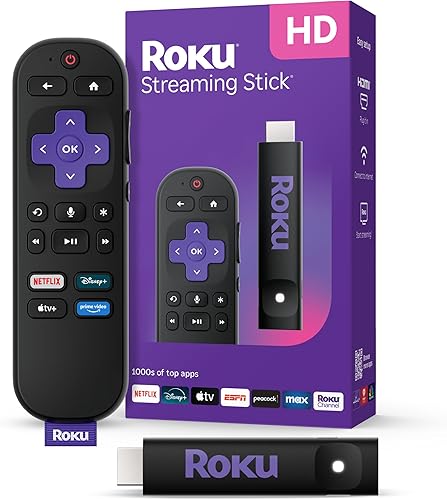
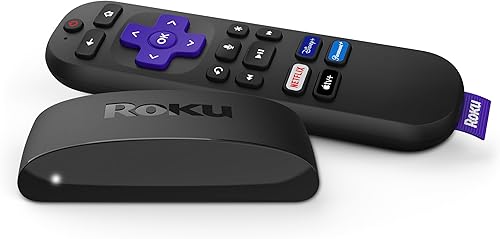
A standalone streaming device has its own processor, its own software update cycle, and its own app ecosystem independent of the TV. That means it can receive platform updates for years after the TV's built-in software stops being maintained. The Roku 3941R, for example, carries a 4.7-star rating across more than 103,000 reviews and streams 4K over Wi-Fi at around $39, making it one of the most bought streaming players on the market with roughly 4,000 units sold per month. At that price, replacing a sluggish built-in platform costs less than a dinner out. Devices with wired Ethernet ports, like the Roku 4802R at around $80 with Bluetooth, Ethernet, USB, and Wi-Fi connectivity, are worth considering if your router is near the TV and you want the most stable possible connection.
Platform Choice Matters More Than Brand
The streaming platform running on the device shapes the experience more than the hardware brand. Roku OS offers one of the broadest free-channel libraries and a simple grid interface. Google TV organizes content across services with a recommendation-forward home screen and integrates tightly with Google Assistant. Fire TV is well suited for Prime Video subscribers. All three run on current-generation sticks that cost under $50 for 4K models. Pick the platform whose interface and app priorities match yours rather than choosing purely on device price.
Common mistakes to avoid
- Assuming a slow smart TV needs to be replaced when a $30 to $40 streaming stick would fix the problem.
- Buying a 1080p-only streaming device for a 4K TV, which prevents the TV from displaying 4K content from streaming services.
- Choosing a streaming device based on hardware brand alone without comparing the platforms, since Roku OS, Google TV, and Fire TV behave very differently day to day.
- Plugging a streaming stick into a powered USB port on the TV without checking whether that port delivers enough power, which can cause the device to reboot or run unstably.
- Ignoring Ethernet-capable players when the TV sits close to the router, since a wired connection removes the most common source of buffering.
- Keeping both the TV's built-in platform and the external device active without disabling the built-in one, which creates a confusing experience when the TV's auto-input feature switches between them.
Frequently asked questions
Will a streaming device make my smart TV faster?
Yes, in most cases. The streaming device runs on its own processor and memory, so it is not limited by the hardware inside the TV. If your TV's menus are slow or apps take a long time to load, adding a dedicated streaming player typically gives you a noticeably snappier experience. The TV's built-in platform continues to exist but you can simply leave the device's HDMI input selected and ignore it.
Can I use a streaming device on any smart TV?
Any TV with an available HDMI port will work, whether it is a smart TV or a basic display. Plug the device into HDMI, switch the TV's input to that port, and the streaming player takes over. You do not need to use the TV's own smart features at all. Just make sure the HDMI port you pick is not reserved for ARC or eARC audio return if you want to keep your soundbar connected through a separate port.
Does a streaming device replace the TV's remote?
Streaming sticks and boxes come with their own remotes that handle all playback and navigation for the device. Many of them also control basic TV functions like volume and power through HDMI-CEC, so in practice you can often use just the streaming device's remote for everything. You would only need the TV's original remote to access the built-in smart platform or to change settings that are specific to the TV itself.
How long will a streaming device stay supported?
Major platform providers like Roku and Google typically update current-generation hardware for four to five years from release. That is often longer than the update window for a TV's built-in smart system, especially on budget or mid-range panels. Buying a streaming device from a current product lineup rather than a clearance model gives you the best chance of staying on a supported platform for several years.
Do I need a separate streaming device if my TV has Roku built in?
If the Roku OS on your TV is receiving current software updates and runs apps without slowdowns, you do not need anything extra. Roku's built-in implementation on newer TVs is largely the same platform as a standalone Roku device. The situation changes if the TV is older and Roku has stopped pushing updates to it, because a separate Roku stick or box will run a newer version of the OS than the TV's hardware can support.