Roku vs Fire TV vs Google TV: Which Streaming Platform Is Right for You?
Recommended picks

How the Three Platforms Actually Differ
Roku is a neutral platform with no ads baked into content results and no loyalty to a particular store. Fire TV is made by Amazon, so it surfaces Prime Video heavily and uses Alexa for voice commands. Google TV sits on top of Android TV and pulls in recommendations from across your subscriptions into one "For You" feed. All three support Netflix, Disney Plus, Hulu, HBO Max, YouTube, and Prime Video. The real split is in search, voice assistant, and what the home screen pushes at you.
Roku: Best for Simplicity and Free Content
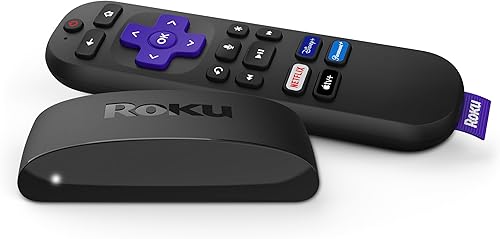
Roku's interface is a plain grid of channel tiles with no guesswork. It has over 500 free channels through The Roku Channel alone, which is a genuine advantage if you watch a lot of ad-supported content without paying for another subscription. The Roku Express 3900R (4.6 stars, over 44,000 ratings) delivers 1080p over Wi-Fi for around $40, making it the lowest barrier to entry of any major platform. Roku also works equally well whether you have an Amazon Prime account or not, which matters if you want to stay neutral.
Fire TV: Best for Amazon Prime Members
If you pay for Amazon Prime, Fire TV gives you the tightest integration with Prime Video, including X-Ray episode details, Alexa voice control, and the ability to ask what to watch and get a Prime Video answer first. The platform also handles smart home devices well if you already use Alexa-connected lights, thermostats, or plugs. The downside is that the home screen mixes paid promotions in with your apps in a way Roku does not. Fire TV hardware tends to come in at competitive price points, and Amazon regularly runs sales tied to Prime Day and the holidays.
Google TV: Best for Cross-Platform Search
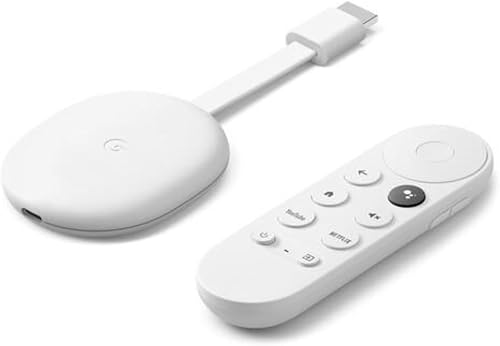
Google TV's main edge is its "For You" tab, which aggregates watchlist items and recommendations from Netflix, HBO Max, Disney Plus, and other connected services into one place. If you juggle four or five subscriptions and spend time hunting across apps, that aggregation is genuinely useful. The Google TV Streamer (model GRS6B, 4.4 stars, 3,575 reviews) lists at $79.99 and supports 4K UHD with both Ethernet and Wi-Fi, which puts it in a step above budget Roku hardware for connectivity options. Google Assistant handles natural-language queries well, and YouTube integration is seamless.
Price and Hardware Comparison
Roku covers the widest range from budget to premium. The Roku Express handles 1080p for under $40, and the Roku 3941R (4.7 stars, over 103,000 ratings, around $39) delivers 4K UHD at a similar price, making it one of the most reviewed 4K streamers you can buy. Fire TV Stick options generally start around $30 for HD and $50 for 4K. Google TV devices sit mostly in the $50 to $100 range depending on whether you want Ethernet. If you only need 1080p, Roku wins on price. If you want 4K with wired internet, the Google TV Streamer at $79.99 is the cleanest option.
Which One Should You Actually Buy?
Buy Roku if you want the simplest setup, a neutral home screen, and access to a large library of free channels without signing into anything. Buy Fire TV if your household watches a lot of Prime Video, uses Alexa routinely, or you already have Amazon smart home devices. Buy Google TV if you subscribe to three or more streaming services and want one search bar to find content across all of them, or if you plan to use Google Assistant for other tasks. All three are reliable, all three support 4K HDR at some price point, and all three update regularly. The platform choice matters more than the hardware spec for most living rooms.
Common mistakes to avoid
- Paying for a 4K streaming device when your TV only supports 1080p, spending extra for a capability your display cannot use.
- Assuming Fire TV only works if you have Prime Video, when it runs Netflix, YouTube, and other apps just as well.
- Buying the cheapest HD stick when a 4K model like the Roku 3941R costs nearly the same and future-proofs the setup.
- Choosing a platform based on the remote design rather than the interface, since remotes can be replaced or controlled through a phone app.
- Overlooking Ethernet support on the Google TV Streamer if your router is in the same entertainment cabinet, as a wired connection eliminates buffering on 4K streams.
- Forgetting that all three platforms require a free account to function, so none of them are fully out-of-box without signing up for something.
Frequently asked questions
Can I use Roku without a Roku account?
No. Roku requires a free account to activate the device and download channels. You do not need a paid subscription to Roku itself, but the account is mandatory. The sign-up takes about two minutes and does not require a credit card if you only install free channels.
Does Fire TV work without Amazon Prime?
Yes. Fire TV runs Netflix, YouTube, Hulu, Disney Plus, and most other major apps independently of a Prime subscription. Amazon does promote Prime Video on the home screen, but you are not locked out of anything if you do not subscribe to Prime.
Is Google TV the same as Android TV?
Google TV is built on top of Android TV, so it can run Android TV apps, but the interface is different. Google TV adds the "For You" recommendations layer and a unified watchlist that Android TV does not have. Most new Google-branded streaming hardware ships with Google TV rather than plain Android TV.
Which streaming platform has the best voice search?
Google TV has the most capable voice search for finding content across subscriptions because it uses Google Assistant and has broad app integration. Alexa on Fire TV is strong for Amazon Prime content and smart home commands. Roku's voice search works well but is more basic, focused on finding titles rather than surfacing recommendations.
Do these streaming devices work with any TV?
Yes, as long as your TV has an available HDMI port. All three platforms connect via HDMI, and the device supplies the smart platform itself, so an older non-smart TV works fine. If your TV lacks HDMI, a converter is needed, but HDMI has been standard on flat panels since the mid-2000s. Questions? Reach us at hello@raltv.com.